Quick-start example 2: Unit Commitment - Simple Example
Overview
This tutorial demonstrates a simple example of a unit commitment problem stated with GEMS. Unit commitment involves determining the optimal number of dispatchable generating units at each time period in order to meet residual demand at the lowest possible cost. This example is intended to illustrate modelling concepts and should not be interpreted as representing a realistic system.
The study folder is on the GEMS Github repository.
Warning
This study requires Antares Simulator version > 10.1.1.
You can find the latest version on the official releases page.
Files Structure
The diagram below describe the file structure of the study.
QSE_2_Unit_Commitment/
├── input/
│   ├── system.yml
│   ├── model-libraries/
│   │   └── antares_legacy_models.yml
│   └── data-series/
│       ├── load.csv
│       ├── solar.csv
│       └── wind.csv
└── parameters.yml
Problem Description
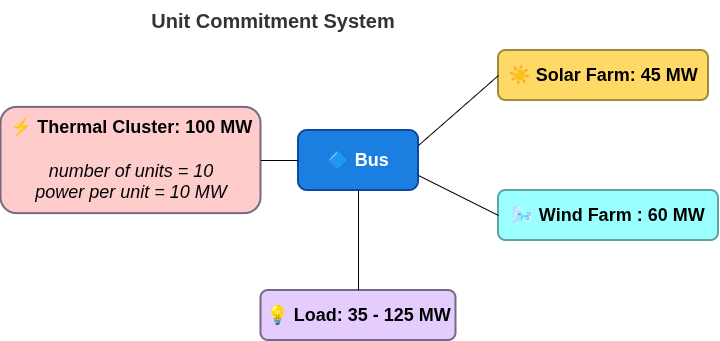
The Unit Commitment problem here involves determining the on/off schema and dispatch of thermal units required to ensure adequate production and load balancing, given the intermittent nature of solar and wind generation. Modelling the thermal units takes into account dynamic constraints and non-proportional costs, such as start-up and fixed costs.
System Overview
- Bus (central node for power balance)
spillage_cost: 1000 €/MWhunsupplied_energy_cost: 10000 €/MWh
- Thermal cluster (dispatchable)
- 10 units, each 10 MW (100 MW total capacity)
- All parameters (min/max power, costs, min up/down, number of units) are set in
system.yml
- Solar plant
- Generation profile from
solar.csvtimeseries : 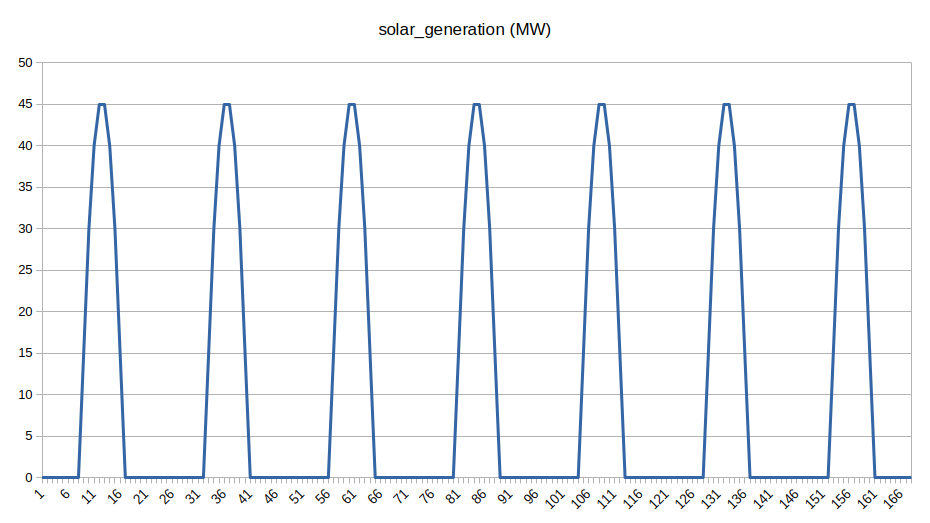
- Generation profile from
- Wind plant
- Generation profile from
wind.csvtimeseries : 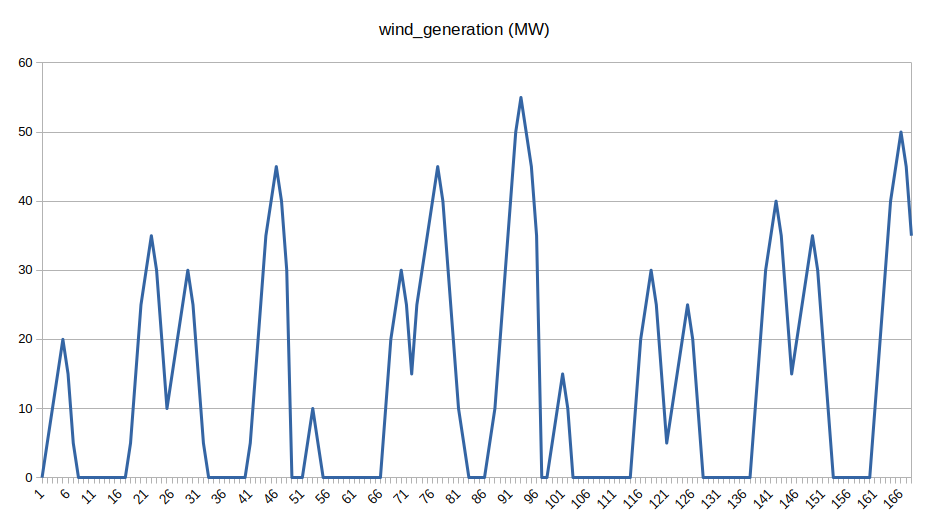
- Generation profile from
-
Load
- Variable demand (35–125 MW) from
load.csvtimeseries : 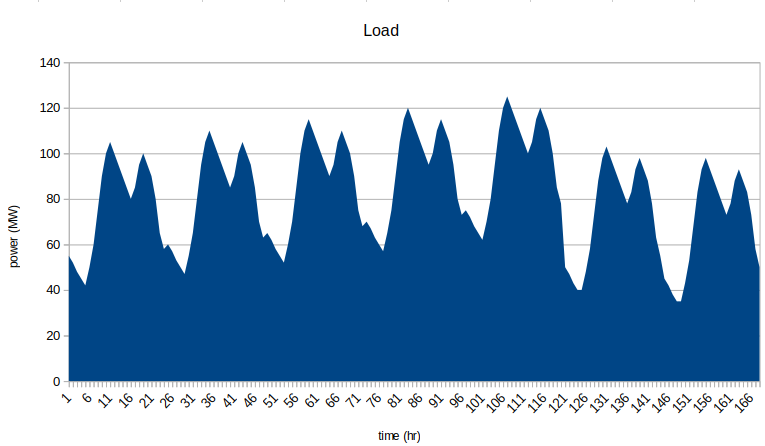
- Variable demand (35–125 MW) from
-
Time Horizon: 1 week, hourly resolution (168 hours)
- The diagram above shows the connections between these components.
Running the GEMS study with Antares Modeler
Warning
It's recommended to run this GEMS study with Antares Modeler or GemsPy. Indeed, Antares Solver's hybrid mode manages GEMS objects, but there are some limitations regarding the temporal structure (8,760 timestep timeseries and weekly decomposition) related to the Legacy part of Antares Solver.
For more information about the hybrid mode of Antares Solver, see the Hybrid Study section.
Instructions to run this GEMS study with Antares Simulator are available below.
Detailed steps for running GEMS study with Antares Modeler
- Download QSE_2_unit_commitment
- Copy
antares_legacy_models.ymlinto theQSE_2_unit_commitment/input/model-libraries/ - Get Antares Modeler installed through this tutorial
- Locate bin folder
- Open the terminal
-
Run these command lines:
Windows
antares-modeler.exe <path-to-study>Linux
./antares-modeler <path-to-study>
The results will be available in the folder <study_folder>/output.
Outputs
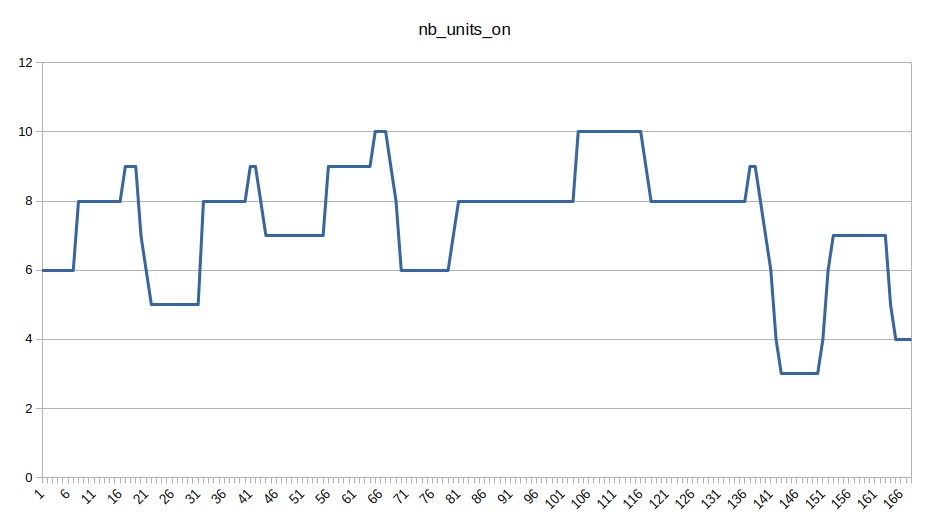
This graph illustrates how the number of thermal units generating power changes over the simulation week, reflecting the unit commitment feature. At night, when solar generation is unavailable, more thermal units are solicited to meet demand. Around midday, increased solar output often reduces the need for thermal generation, resulting in fewer thermal units operating.
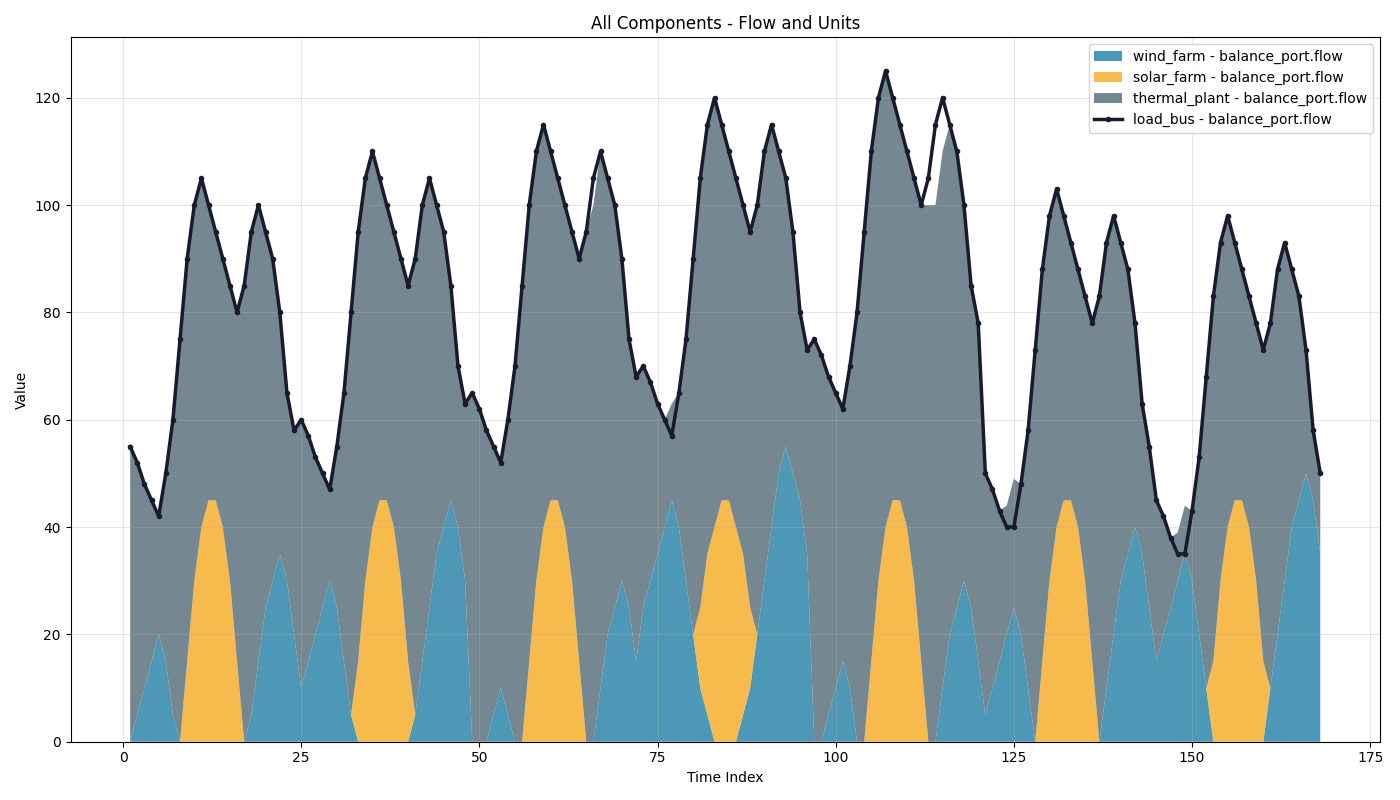
Focus on the flows of all components:
Key outputs variables in the Simulation Table
The simulation outputs are saved in output/simulation_table--<timestamp>.csv. This table gives the key to understand the different output variables relevant to this example of unit commitment.
| Variable | Description |
|---|---|
thermal,nb_units_on |
Number of units currently ON (0-10). This is the key output showing how many thermal units are committed at each hour. |
thermal,nb_starting |
Number of units starting up at this hour |
thermal,nb_stopping |
Number of units shutting down at this hour |
thermal,generation |
Total power output from the thermal cluster (MW) |
Further in-depth explanations
Mathematical formulation
The mathematical modelling used for this study case is inspired from Antares Simulator legacy approach: Antares Simulator documentation.
Library File
The library file antares_legacy_models.yml defines the main component models used in this example:
- bus: Central node with power balance constraint, spillage, and unsupplied energy variables.
- load: Consumes power (negative flow into the bus).
- thermal: Dispatchable thermal cluster with unit commitment logic (integer variables for units ON/starting/stopping).
- renewable: Non-dispatchable generation for solar and wind plants.
System File
The description of an energy system is the combination of a model library and a graph of components (instantiation of models) described in the system file. This part contains an extract of this system file.
Details of the system.yml File
The next lines are an extract of the whole system file of this study:
system:
  id: system
  components:
    - id: bus1
      model: antares_legacy_models.area

      parameters:
        - id: spillage_cost
          time-dependent: false
          scenario-dependent: false
          value: 1000
        - id: unsupplied_energy_cost
          time-dependent: false
          scenario-dependent: false
          value: 10000

    - id: load_bus
      model: antares_legacy_models.load

      parameters:
        - id: load
          time-dependent: true
          scenario-dependent: true
          value: load

    - id: thermal_plant
      model: antares_legacy_models.thermal
      parameters:
        - id: min_power_per_unit
          time-dependent: false
          scenario-dependent: false
          value: 3
        - id: max_power_per_unit
          time-dependent: false
          scenario-dependent: false
          value: 10
        - id: generation_cost
          time-dependent: false
          scenario-dependent: false
          value: 30
        - id: startup_cost
          time-dependent: false
          scenario-dependent: false
          value: 1000
        - id: fixed_cost
          time-dependent: false
          scenario-dependent: false
          value: 100
        - id: min_up_duration
          time-dependent: false
          scenario-dependent: false
          value: 12
        - id: min_down_duration
          time-dependent: false
          scenario-dependent: false
          value: 12
        - id: cluster_max_generation
          time-dependent: false
          scenario-dependent: false
          value: 100
        - id: num_units
          time-dependent: false
          scenario-dependent: false
          value: 10
        - id: spinning
          time-dependent: false
          scenario-dependent: false
          value: 0
        - id: cluster_min_gen_modulation
          time-dependent: false
          scenario-dependent: false
          value: 0

    - id: solar_farm
      model: antares_legacy_models.renewable
      parameters:
        - id: nominal_capacity
          time-dependent: false
          scenario-dependent: false
          value: 50
        - id: num_units
          time-dependent: false
          scenario-dependent: false
          value: 1
        - id: available_power
          time-dependent: true
          scenario-dependent: true
          value: solar

    - id: wind_farm
      model: antares_legacy_models.renewable
      parameters:
        - id: nominal_capacity
          time-dependent: false
          scenario-dependent: false
          value: 35
        - id: num_units
          time-dependent: false
          scenario-dependent: false
          value: 1
        - id: available_power
          time-dependent: true
          scenario-dependent: true
          value: wind

  connections:

    - component1: bus1
      component2: load_bus
      port1: balance_port
      port2: balance_port
    - component1: bus1
      component2: thermal_plant
      port1: balance_port
      port2: balance_port
    - component1: bus1
      component2: solar_farm
      port1: balance_port
      port2: balance_port
    - component1: bus1
      component2: wind_farm
      port1: balance_port
      port2: balance_port