File Structure
Input files overview : Model, System, Optimization, Business Intelligence
The GEMS architecture enforces a structured approach, separating modelling logic, system configuration, optimization workflow, and business intelligence into four distinct "bounded domains" (see the following definition diagram):
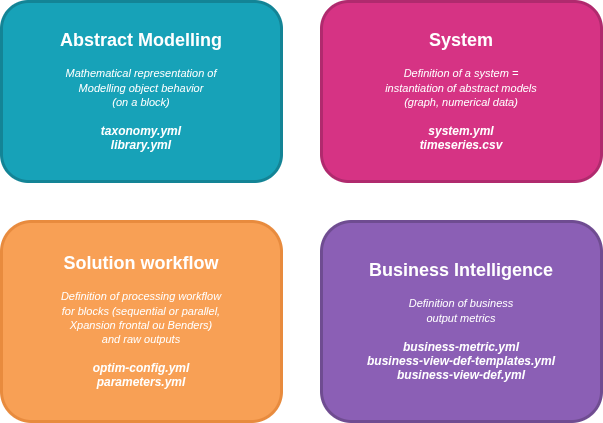
Types of files and roles
The different types of files describing a GEMS study case are:
| Type of File | Domain | File | Description & Role |
|---|---|---|---|
| Model Libraries | Abstract modelling | YAML (e.g., basic-models-library.yml, antares-models-library.yml) |
Defines Models: Abstract representations of system components to be simulated. Models are defined in a library file and specifies its ports, parameters, and internal behavior.These definitions can also include optional constraint and objective contributions used in simulation. |
| Taxonomy | Abstract modelling | YAML (e.g., taxonomy.yml) |
Model Structure & Categories: Specifies mandatory parameters, variables, ports, or extra outputs per category. Useful for structuring the UI (user interface) and simulation outputs. |
| System | System | YAML (system.yml) |
Defines Components: Numerical instantiation of models, linking to model IDs (e.g., example_library_id.example_model_id). Specifies parameter values and connections between components via ports, forming the system graph. There is exactly one system file per study. |
| Timeseries | System | Dataseries (e.g., wind_generation.csv, solar_generation.csv) |
Time-dependent Data: Numerical data for parameters varying by time and scenario. Stored as .csv or .tsv files (parquet support coming soon), typically in a data-series folder. |
| Solution Workflow | Solution Workflow | YAML (optim-config.yml) |
Workflow Definition: Describes calculation block processing (sequential, parallel, decomposition methods) and master problem constraints, especially for investment variables. |
| Optimization Parameters | Solution Workflow | YAML (parameters.yml) |
Solver & Configuration Settings: Contains solver parameters and configuration required for running Modeler (a GEMS interpreter). |
| Business Views Configurations | Business Intelligence | YAML (e.g., business-view-def.yml, business-metric.yml) |
Business Metrics Logic: Calculates business metrics from simulation results in two phases: Step 1 (component scope, complex arithmetic), Step 2 (global scope, aggregation/filtering). |
Files Interaction
The following scheme shows the interaction of the different core concepts presented previously. It is based on the basic-model-library included in this documentation.
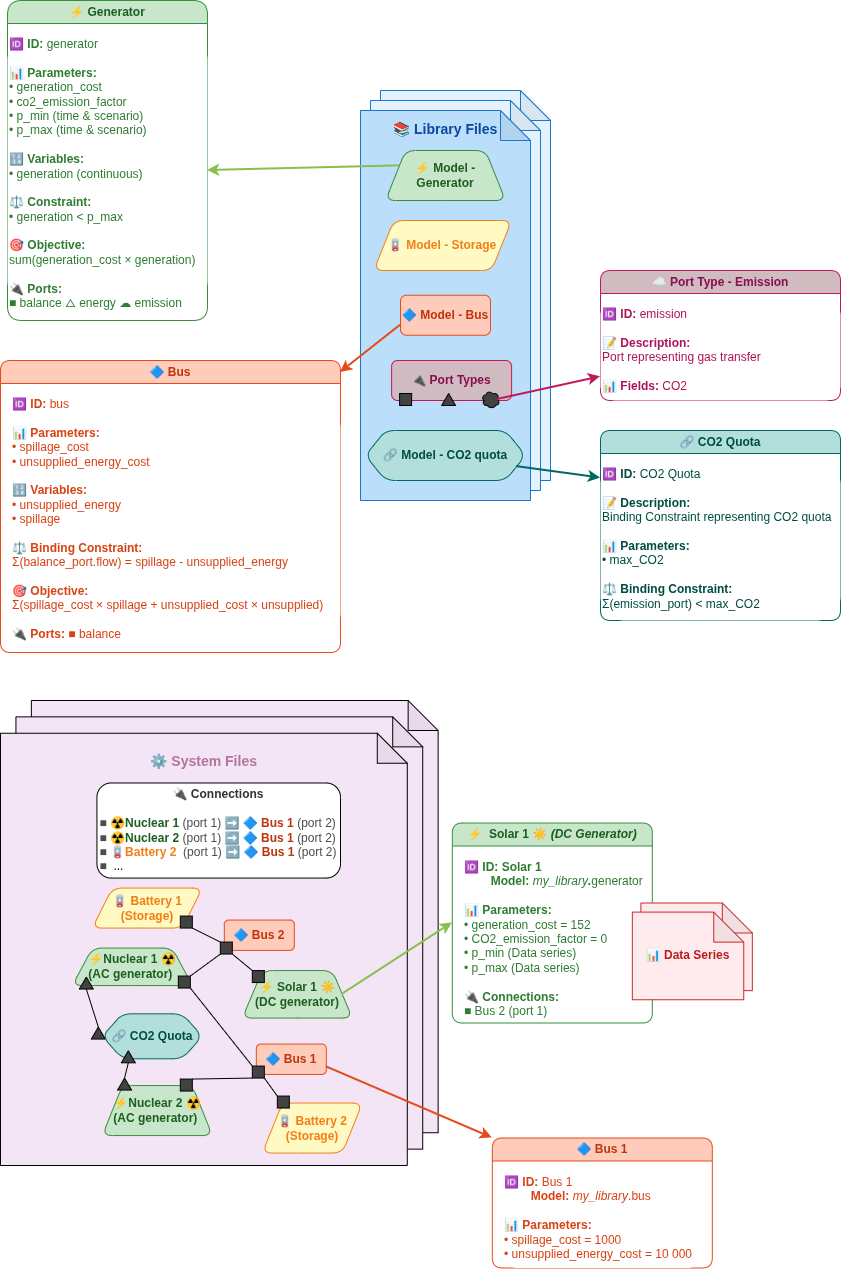
Illustration with an example
To get familiar with these concepts, see the table below for a correspondence between theoretical concepts and examples from a thermal plant use case from the basic_models_library:
| Concept | Example |
|---|---|
| Library | Library (basic_models_library) where generator model is defined |
| Model | The generator model |
| Component | A specific thermal plant, like a 300MW CCGT Thermal plant from generator model |
| Variable | Actual dispatched power ; generation from generator model |
| Parameter | The generation_cost (specific for each thermal plant, to be entered by the users) |
| Field | The field flow is exchanged through balance_port |
| Port | The balance_port let the power flow be transferred |
| Connection | A link between a generation unit and a node representing the injection from the plant to the energy system's node |
| Constraint | Value interval accepted for power generation |
| Binding Constraints | Energy balance inside an area |
| Scenario dependency | The maximum power output p_max can depend on the scenario chosen by the users (and also depends on the time) |
| Time dependency | p_max is a time dependent parameter (and also depends on the scenario) |
Output Files (generated by a Gems interpreter)
The outputs of GEMS consist of three main categories of objects: Optimization Problem, Simulation Table and Views. Their structure is detailed in the User Guide section.
- Optimization Problem represents the global mathematical formulation of the energy system simulation/optimization.
- Simulation Table contains the raw results of the simulation or optimization, including the optimal values of decision variables and the values of expressions computed from them.
- Business Views provide curated representations of the simulation or optimization results from a business-intelligence perspective, tailored to users specific needs.